Your browser does not support JavaScript! This site works best with javascript ( and by best only ).Print Labels from Excel, CSV and Google Sheets | Label LIVE

Bulk print labels from Excel, CSV and Google Sheets, easily

Printing labels from a spreadsheet is often costly and difficult. Label LIVE reads Excel files, CSV files and Google Sheets, then prints one unique label for every row, on the printer you already own.

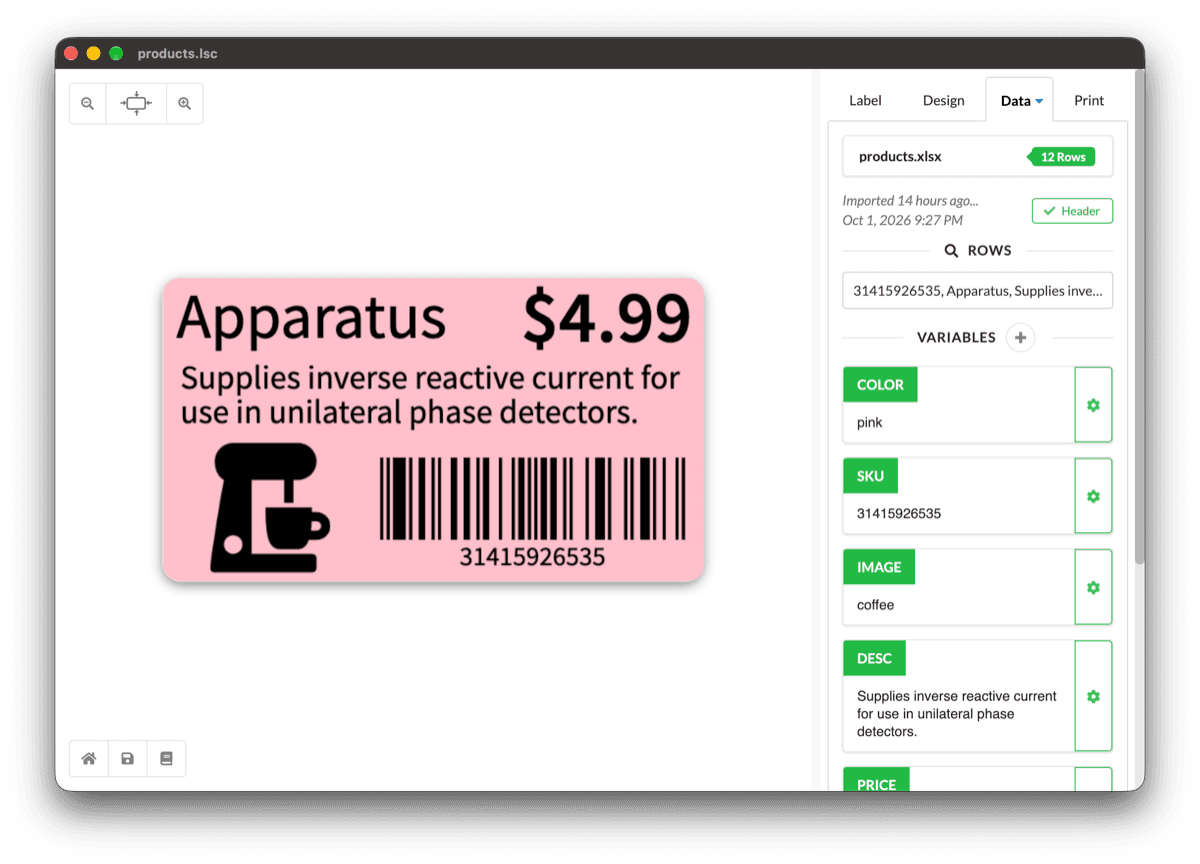
Label LIVE Data tab with product rows imported from products.xlsx, color, SKU, image and description variables mapped to a pink product label
A triangle cut out

Print labels from Excel data, CSVs and more

Easily create thousands of label variations based on data in an Excel spreadsheet, from different part labels to modifying ingredients in your product line.

    Bring Your Own Data, in Any Format

    Label LIVE reads the spreadsheet you already keep. Excel workbooks, CSV files and Google Sheets all connect to a label, and each column becomes a variable you can place on the canvas. If the data lives nowhere yet, the built-in spreadsheet holds it inside Label LIVE, so there is no separate file to keep in step.

    A CSV is just rows and columns, so a price list, an inventory export or a bank report works the same way as an Excel file. The first row supplies the column names, and those names become the variables for each unique label. Re-export the file, reprint, and the labels follow the data without any redesign.

    Every row can produce its own label, so a single print job covers a whole product line. Variables handle prices, sizes and variants, serial numbers handle sequential codes, and dynamic copies handle custom quantities per row.
    Common Questions About Printing from a Spreadsheet

    Can I print labels from a CSV file?

    Yes. Import the CSV, place its columns on the label, and print one label per row. Excel and CSV integration covers the details.

    Can I print labels from Google Sheets?

    Yes. The Google Sheets guide walks through connecting a sheet and printing from it.

    Related FeaturesBuilt-in Spreadsheet

    Do I need Excel installed?

    No. Label LIVE reads the file itself, and the built-in spreadsheet means a spreadsheet application is not required at all.

    Which printers does it work with?

    Label LIVE prints to thermal, inkjet and laser printers, on rolls or multi-label sheets. See the printers Label LIVE works with.

    What does it cost?

    Label LIVE offers one-time Home, Business, and Logic licenses, plus an optional monthly subscription. The 14-day trial includes every feature, and current plans are on the pricing page.

    Find out why Label LIVE is the best

    Easily create thousands of label variations based on data in an Excel spreadsheet, from different part labels to modifying ingredients in your product line.

    People love Label LIVE, seriously

    Label LIVE Reviews
    I had a last minute order that needed labels. We had not planned on this particular order going out until my admin returned. Support walked me through it with ease. From a small business to another, kudos on your top notch customer service.
    Joshua D.

    Owner, Consumer Goods Company

    🌟🌟🌟🌟🌟

    Ease of installation and configuration, flexibility, multi-printer support, ability to print from a spreadsheet, and exceptional customer support.
    Nick H.

    Graphic Designer

    🌟🌟🌟🌟🌟

    The software is incredibly user friendly and easy to navigate through. This is a great investment for anyone who makes labels on a daily basis, especially if you haven't found a program that is right for you yet.
    Dana S.

    Marketing, Furniture Company

    🌟🌟🌟🌟🌟

    Ease of installation, and connection to [Zebra] printer was a breeze. Ability to pull data straight from spreadsheet tables provides users a truly powerful and time-saving tool.
    Tom F.

    Owner, Oil & Energy Company

    🌟🌟🌟🌟🌟

    I really like the simplicity and that you easily can import XLS files and work with several products at once but only with one label template that you create really easily with this software.
    Petter N

    CEO, Arts and Crafts Company

    ❀️❀️❀️❀️❀️

    Label LIVE is very easy to use and gives you options to adjust multiple facets of each label. Also a big bonus of being able to save sheets of labels, printing 120 at a time is typical in our office.
    Kathryn B.

    Inventory Assistant

    🌟🌟🌟🌟🌟

    This software is super simple to use and code to create perfect and awesome looking labels for all our products. Any time I ran into a question as hard or as simple as they come, representative was so great at responding with a solution immediately. Thanks for an excellent solution to our labeling issue.
    Mackenzie Y.

    Information Technology, Consumer Goods

    ❀️❀️❀️❀️❀️

    Super simple clean and obvious functional design with no unnecessary clunky features like many other label solutions have. Integrates really well with excel sheets for printing vast arrays of data, including data variables for how many print quantities.
    Blake M.

    Broadcast Engineer

    ❀️❀️❀️❀️❀️

    Simple, easy pricing

    No hidden costs. A simple pricing system built for individuals and businesses.

    Home

    $47.99

    one-time
    βœ“Text, Images and Shapes
    βœ“Use spreadsheet data
    βœ“Works with 40+ printers
    βœ“Unlimited label printing
    Subscription

    $19.99

    per/month
    βœ“All features included
    βœ“Affordable
    βœ“Pay as you go
    βœ“Cancel anytime
    A blog icon
    Guides

    How to make Label LIVE work for you, in detail.

    Read the guides

    Computer monitor icon
    Find Answers

    If you have questions... we have answers. Check out our in-depth FAQs.

    View the FAQs

    QR Code Icon
    Barcodes

    See the barcodes we support and learn how to use them in your labels.

    See more barcodes